


Track Any Phone
4.51.50K Reviews
App Specs
- Version
- 3.5.5
- Updated On
- License
- Free
- Downloads
- 10,000,000+
- Developer
- Family Locator Apps
- Categories
- Travel & Local
- Platform
- Android, iOS
Screenshots
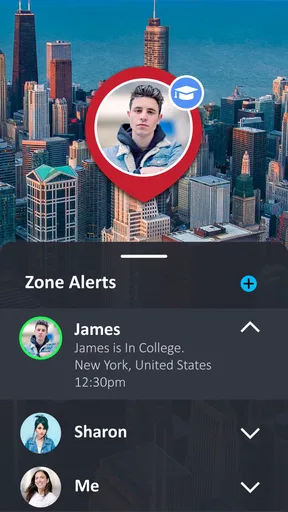
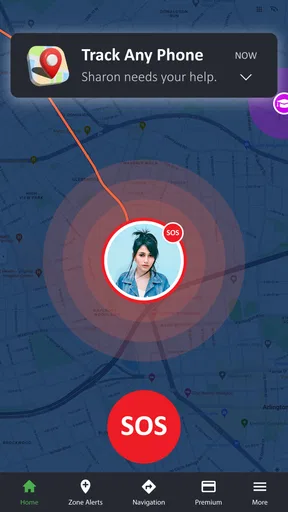
 Analysis by AppCompare
I judge a location app less by how impressive its map looks than by whether it helps people make a clear plan without turning every trip into a check-in. Track Any Phone is a free travel and local app from Family Locator Apps, built around sharing a phone’s location in one direction. That focus can suit families or trusted contacts who want a simple way to coordinate, but tracking should always be agreed to by the person carrying the phone. It is not a substitute for consent or a reason to monitor someone secretly.
Start with a clear, shared routine
The useful way to approach a locator is to decide what you need before opening the map. Is the goal to know when a family member has arrived, help a friend find a meeting point, or locate your own phone? Those are different needs, and a one-way sharing setup works best when both people understand who is sharing, who can see the location, and when that sharing should stop.
For a household, I’d agree on a small number of practical moments to check rather than watching a dot throughout the day. For example, a parent and an older child might use it to confirm arrival after an evening activity, then stop sharing when the trip is over. That keeps the location feature tied to a purpose instead of making constant monitoring feel normal.
Check the choices before relying on it
Before anyone depends on a location app for a pickup, I recommend checking its current setup and access choices together. Make sure the person whose phone is being shared understands the arrangement and knows how to end it. If you are setting it up for a relative who is less comfortable with phones, walk through the steps while you are together rather than trying to troubleshoot from across town.
Location is only useful when the phone can provide it. A powered-off device, poor reception, or restricted location access can make a map less helpful at exactly the wrong moment. I would treat the app as a coordination aid, not a guaranteed recovery service, and keep a simple backup plan: agree on a meeting point or a call if the map does not give a dependable answer.
Build a faster habit without overchecking
A little planning can make a location-sharing tool easier to use. Settle on a short message such as “I’m here” when the map looks unclear, and decide who should contact whom if an arrival is delayed. For regular trips, using the same pickup place and checking at the same stage of the journey is more useful than repeatedly refreshing a screen.
This is also where the app’s one-way approach may feel different from broader family-safety services. Some alternatives are designed around mutual sharing, group maps, or a larger set of family tools. Those can make more sense for a whole household that wants everyone visible to everyone else. A simpler locator can be a better fit when one person only needs to share their position with a trusted contact, without building a larger social map around it.
Worth Reading Before You Choose

Flipboard Shows What News Apps Must Do Beyond the Feed

Switching to Android Auto Means Rethinking Your Driving Routine

Google Calendar Makes a Crowded Week Easier to Manage

Ludo King Makes the Most of the Minutes Between Plans

Baby Panda World Brings Quick Play to Modern Phones, but Its Game Library Feels Busy

ESPN’s Live Game View Makes Following Close Games Easier
Keep expectations and boundaries realistic
Location services can be affected by a phone’s settings and surroundings, so I would not use any map as proof of someone’s exact actions or intentions. A location point gives context, not a complete account of what is happening. If precision matters for a safety decision, contact the person directly and use local emergency services when appropriate instead of relying on an app.
I would also skip this kind of tool if the person carrying the phone has not freely agreed to share their location, or if you need a professional lost-device system with account recovery and device controls. A locator is most helpful when it solves a modest coordination problem and everyone involved is comfortable with the arrangement.
Getting Started with Track Any Phone
The first thing I noticed about Track Any Phone is how straightforward it is to get started. You don't need to be a tech wizard to figure it out. Just download it from the App Store or Google Play, and you’re off to the races. The interface is clean, which is a relief because nobody wants to deal with a cluttered screen when they're trying to chase down a phone.
After installation, the app guides you through a simple setup process. It’s intuitive, and you’ll find yourself nodding along as you go through the steps. You get to create an account, set your preferences, and boom—you’re ready to track!
The Features That Stand Out
Now, let’s talk about what you can actually do with this app. It’s more than just a fancy GPS; it’s packed with features that make tracking a breeze. Here’s a quick run-through:
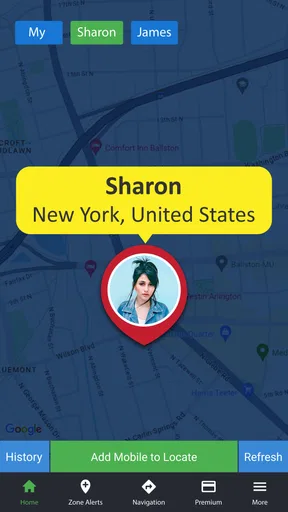
- Real-time GPS tracking: This is probably the feature you’ll cherish the most. You can see the exact location of the phone you’re tracking, updated in real-time. It’s like having a little detective right in your pocket.
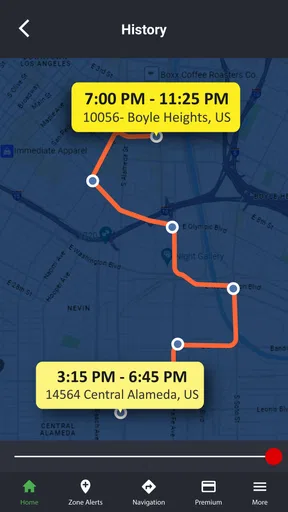
- Location History: Not only can you see where the phone is now, but you can also check where it’s been. This feature is a lifesaver when you’re trying to retrace steps.
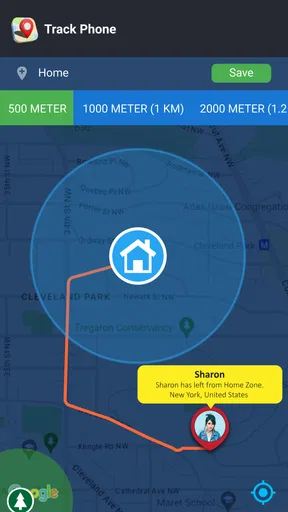
- Geofencing: This is one of my favorites. You can set up boundaries and get notified when the phone crosses them. It’s perfect for keeping tabs on your kids or ensuring a phone doesn’t wander too far from home.
The User Experience
The app’s user experience is worth mentioning. It’s smooth, with minimal lag, which is essential when you’re relying on real-time updates. The design is sleek and modern, making it easy to navigate even if you’re not the most tech-savvy person around.
One thing I really appreciated was the app’s responsiveness. Every time I tapped on a feature, it responded instantly. There’s nothing more frustrating than an app that freezes at the crucial moment, but luckily, that’s not an issue here.
How I’d use the map in a real day
Picture a familiar, low-stakes situation: I’m collecting a relative after an appointment, and they are waiting outside an unfamiliar building. If we have already agreed to share location, I can use the map to find the right entrance instead of trading several vague messages about nearby shops or street corners. If the marker appears stale or the person has moved indoors, I would call or message rather than treating the map as an exact live view.
Location history can be helpful in a different way: it may help someone retrace a route after realizing a phone or bag was left behind. But I would use it as a clue, not a guarantee. A route can narrow the search area; it cannot tell me whether a device is still there or who has it. That distinction matters when deciding whether to keep searching, contact the person, or use the phone’s own recovery tools.
Small decisions that make sharing smoother
For regular use, I find it helps to agree on the purpose and duration of sharing before anyone needs it. A family might decide that location is useful during a commute or an agreed pickup, but unnecessary during the rest of the day. This creates a predictable routine and makes it easier to notice when sharing is no longer needed, rather than leaving access in place by habit.
It is also worth checking whether a location update is current before acting on it. If a person’s phone is indoors, has lost connection, or cannot provide a fresh position, a map may not answer the question you have. A quick call is often the better next step. This is a practical trade-off: the app can reduce back-and-forth when the location is clear, but it should not replace direct communication when the display is ambiguous.
Who may prefer another kind of locator
The app’s one-direction model is a useful fit when one person wants to share with a trusted contact and does not need a full group map. If everyone in a household wants to see one another, a family-oriented service built around mutual sharing may feel more natural. If the main concern is a missing personal device, the phone platform’s own find-device service may offer more relevant recovery controls than a family locator.
I would not choose a location-sharing app as a way to verify a partner’s movements, supervise an adult without agreement, or make high-stakes safety decisions from a screen. Those uses create privacy problems and ask more of a location point than it can provide. The best use is narrow and transparent: help people who have opted in coordinate a trip, a pickup, or an arrival.
Cost, compatibility, and who should install it
The app is free to install, with in-app purchases listed from about five dollars to about sixty dollars per item. I would check the purchase screen carefully before confirming anything, especially if I only need basic sharing. The app is rated for everyone, and its current version is 3.4.3, with Android support starting at version 6.0. Those details make it accessible to many users, though an older or low-powered phone can still affect the practical experience of location tools.
Its 4.5 average from around 192,000 ratings and more than 10 million installs suggest that many people have tried it, but popularity does not settle whether its sharing model suits your household. I’d install it when a trusted person has a clear, limited reason to share their position and everyone is comfortable with the arrangement. I’d look elsewhere if I needed robust device recovery, group coordination for a large family, or a tool that works without the person carrying the phone taking part.
Security and Privacy
Of course, with an app like this, privacy is a huge concern. You don’t want just anyone being able to track you, right? Thankfully, Track Any Phone takes security seriously. All your data is encrypted, and you have full control over who can access your location. Plus, you can easily revoke access if needed.
It’s comforting to know that while you’re tracking someone’s phone, your own privacy isn’t being compromised. The app strikes a good balance between functionality and security, which is exactly what you need.
Wrapping It Up
All in all, Track Any Phone is a solid app that delivers on its promises. Whether you’re a parent trying to keep an eye on your kids, or just someone who wants to ensure their own phone is never lost, this app has got you covered. It’s reliable, efficient, and most importantly, easy to use.
If you’re in the market for a tracking solution, I’d say give Track Any Phone a shot. It might just become one of those apps you wonder how you ever lived without.
Pros
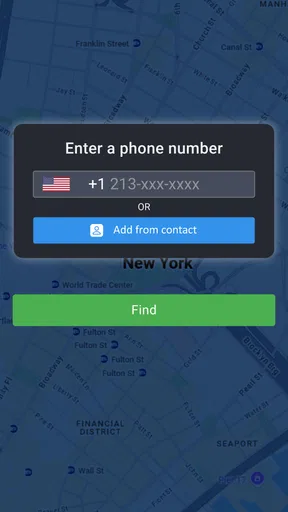
- Easy location tracking with just a phone number.
- User-friendly interface for all skill levels.
- Real-time updates ensure accurate tracking.
- Works on both Android and iOS devices.
- No need for additional hardware.
Cons
- Requires internet connection to function.
- Privacy concerns due to location sharing.
- Limited features in free version.
- May drain battery with continuous use.
- Not available in all countries.
FAQs for Track Any Phone
What is Track Any Phone and how does it work?
Track Any Phone is an application designed to help users locate mobile devices in real-time. It works by using GPS technology to pinpoint the location of a phone. Users need to install the app on the target device, and with proper permissions, the app can track its location, providing updates on movement and current whereabouts.
Is Track Any Phone safe and secure to use?
Yes, Track Any Phone is designed with user safety and privacy in mind. It requires consent and proper permissions from the phone’s owner before tracking can begin. The app uses encryption to protect data and ensures that location information is only accessible to authorized users, safeguarding personal information from unauthorized access.
Can Track Any Phone be used on both Android and iOS devices?
Track Any Phone is compatible with both Android and iOS devices. Users can download the app from either the Google Play Store or the Apple App Store. It's important to ensure that the app is updated to the latest version for optimal performance and compatibility with the latest operating system updates.
What are the limitations of Track Any Phone?
One limitation of Track Any Phone is that it requires an active internet connection for accurate GPS tracking. Additionally, the app must be running in the background on the target device, which may affect battery life. Users should also be aware of privacy laws and ensure they have permission to track a device, as unauthorized tracking is illegal in many regions.
How do I uninstall Track Any Phone if I no longer need it?
To uninstall Track Any Phone, navigate to your device’s settings and access the app manager. Find Track Any Phone in the list of installed apps and select ‘Uninstall.’ Follow any on-screen prompts to complete the process. On iOS, press and hold the app icon until it jiggles, tap the ‘X’ that appears, and confirm the deletion.


